Fighter K 3D
A downloadable game for Windows
Four champions. Four ways to control the arena.
Fighter K 3D is a free tactical arena combat demo for Windows. Circle your opponent, chain attacks and find the right answer to their powers. Fight with 3D characters in a circular arena, with a side-view camera and a pixelated visual style.
Movement is part of combat: sidestepping attacks, dashes and abilities let you reposition while fighting. Learn when to apply pressure, defend or save a skill for a counter.
English and Spanish are included in one download. Select English using the Español / English option in the game menu. The interactive tutorial and F1 guide follow your language choice, which is saved.
Español — descripción e instrucciones
Una sola descarga incluye español e inglés. Elige Español / English en el menú. El tutorial y la guía F1 cambian con el idioma y tu elección se guarda.
Cuatro campeones. Cuatro formas de dominar la arena.
Fighter K 3D es una demo de combate táctico con personajes y escenarios tridimensionales, cámara lateral y acabado pixelado. Rodea a tu rival, encadena ataques, controla el espacio y encuentra la respuesta adecuada a sus poderes.
El movimiento forma parte del ataque: las técnicas laterales, los desplazamientos y las habilidades permiten cambiar de posición mientras luchas. Aprende cuándo presionar, cuándo defenderte y cuándo guardar una habilidad para responder.
Elige tu estilo
- Giatsu: garras de jade, barriles y dragones de fuego para controlar el ritmo del duelo.
- La asesina: dagas, invisibilidad y teletransportes para crear oportunidades y castigar al rival.
- La bruja pistolera: disparos, electricidad y campos de fuego para presionar desde distintos ángulos.
- El caballero Red Sun: espada, escudo y poderes de luz. Su parry puede devolver proyectiles al enemigo.
Qué incluye esta demo
- Cuatro campeones seleccionables y combates contra la IA.
- Tres dificultades: Fácil, Normal y Difícil.
- Arena circular con movimiento en profundidad.
- Combos, parry, dash, habilidades y definitivas.
- Práctica libre y tutorial por lecciones, con ejemplos y avance automático al completar los ejercicios.
- Guía de condiciones y controles dentro del juego.
- Ajustes independientes de volumen general, música y efectos.
Controles
- WASD o flechas: moverse. W y S permiten rodear al rival.
- Clic izquierdo / J: ataque y cadenas de combo.
- Clic derecho / I: técnica; combínala con direcciones y ataques previos.
- Shift + dirección: dash. K: parry.
- 1, 2, 3 y 4: habilidades. L: definitiva.
- Esc: menú y pausa. F1: guía.
Con la bruja, adelante + (I o clic derecho) prepara el campo de fuego: apunta con el cursor y confirma con clic izquierdo. Adelante y atrás se interpretan respecto a la posición del rival.
Instalación
- Descarga el ZIP para Windows y extrae todo su contenido.
- Abre FighterK3D.exe. No necesitas instalar Unreal Engine.
- Elige idioma, campeón, rival y dificultad, y pulsa JUGAR. Si es tu primera partida, empieza por TUTORIAL.
Windows de 64 bits y gráfica compatible con DirectX 12. Se recomienda una resolución de 1280 × 720 o superior para leer la interfaz. Los requisitos mínimos de hardware todavía están en evaluación. Si Windows indica que falta VCRUNTIME o MSVCP, utiliza el instalador oficial de Microsoft incluido en Prerequisites.
Una demo en desarrollo
Esta versión está centrada en duelos contra la IA. Animaciones, efectos, interfaz y equilibrio siguen en revisión. Todavía no incluye multijugador online, versión móvil ni soporte de mando validado.
Tu opinión ayuda: cuéntame en los comentarios qué campeón probaste, qué dificultad elegiste y qué combate o control te resultó confuso. Si encuentras un fallo, indica los pasos para reproducirlo y tu equipo.
Créditos y herramientas
Creado con Unreal Engine. El desarrollo utiliza herramientas de IA generativa para partes del código, textos, gráficos, audio y apoyo a la animación, junto con edición e integración. El paquete incluye créditos y avisos de terceros.
Choose your fighting style
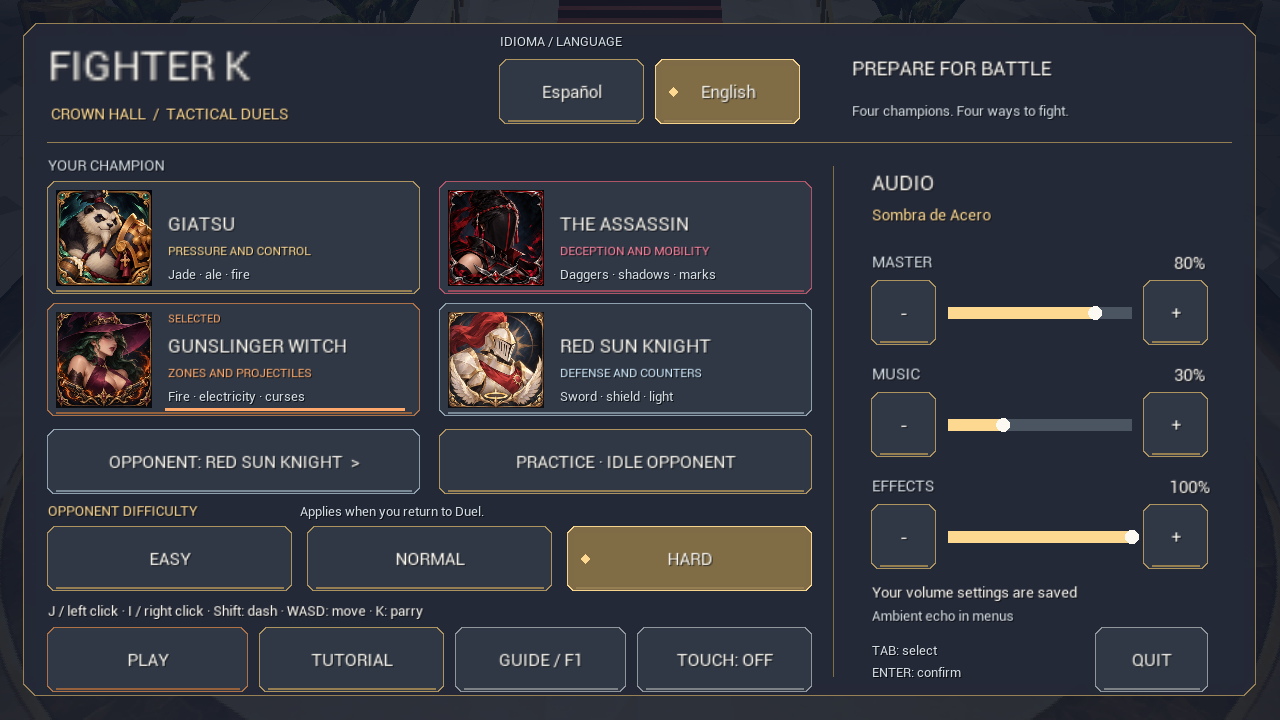
- Giatsu: jade claws, barrels and fire dragons to control the pace of a duel.
- The Assassin: daggers, invisibility and teleports to create openings and punish opponents.
- The Gunslinger Witch: gunfire, electricity and fire fields to apply pressure from different angles.
- Red Sun Knight: sword, shield and light abilities. His parry can reflect projectiles.
Inside the demo
- Four playable champions and single-player duels against AI.
- Easy, Normal and Hard difficulty.
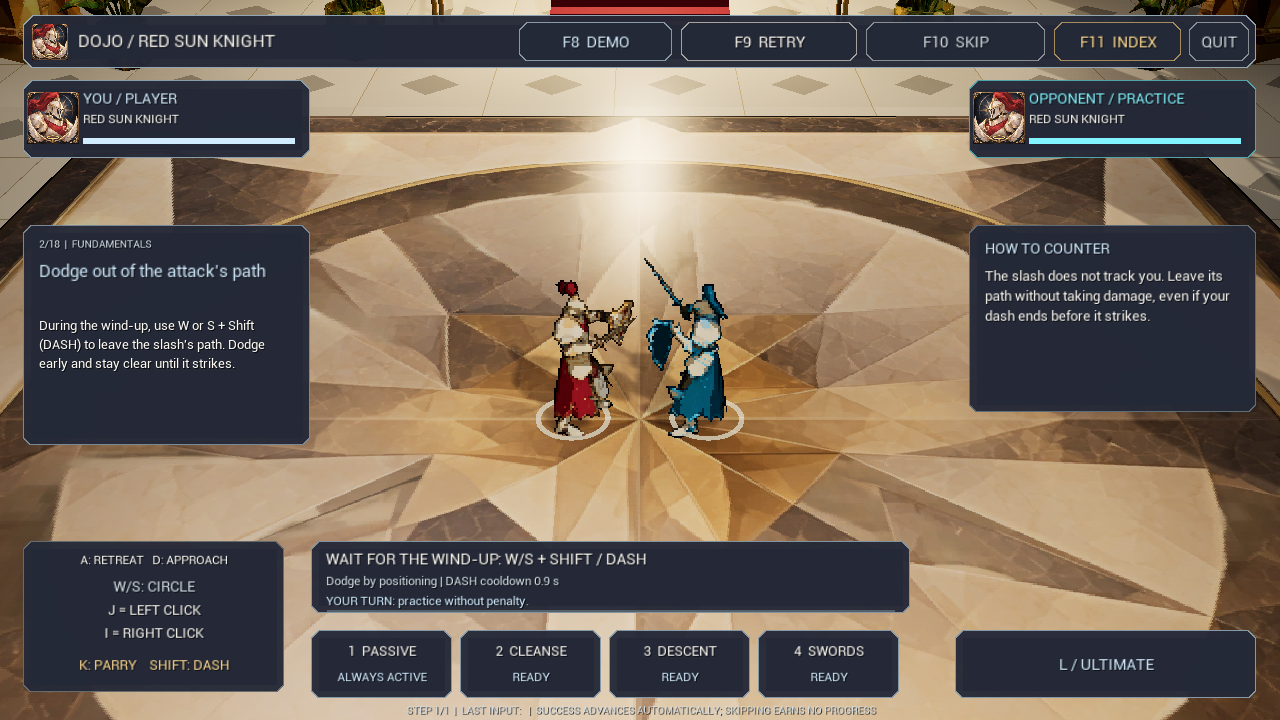
- Directional combos, parries, dashes, abilities and ultimates.
- Free practice and an interactive tutorial that advances when you complete each exercise.
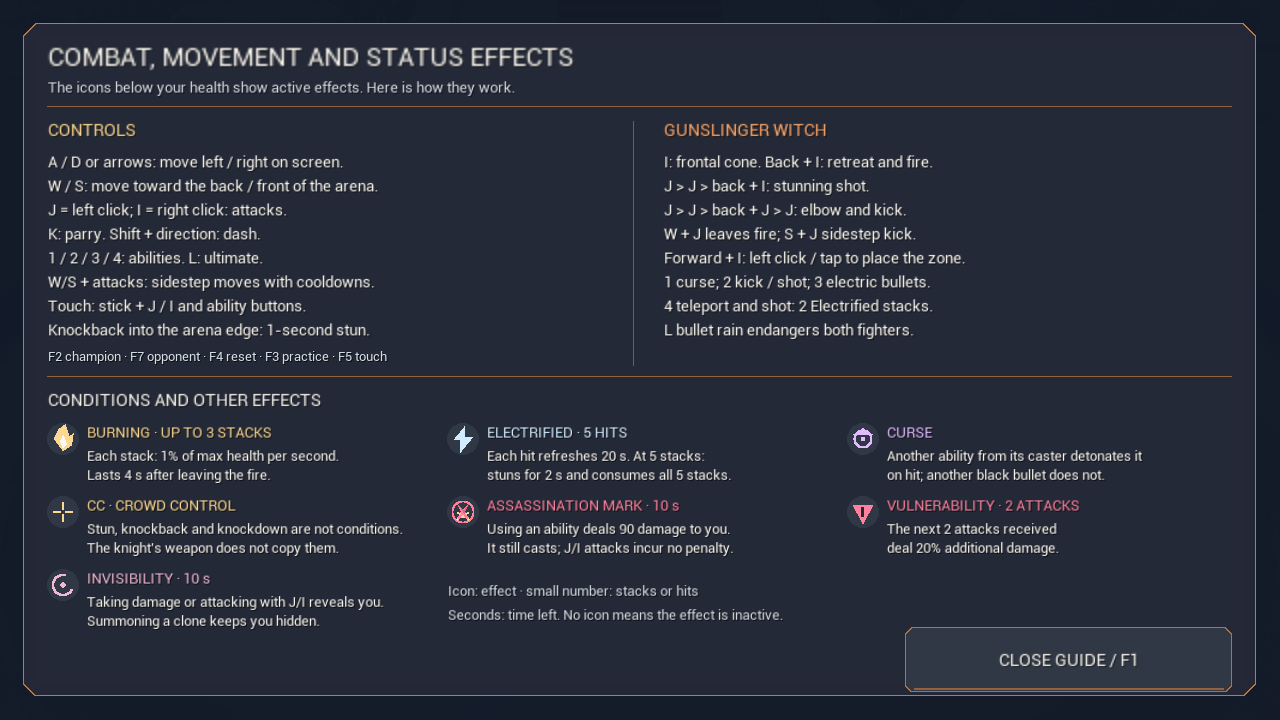
- An in-game guide covering controls, champion moves and status effects.
- Separate master, music and sound-effect volume settings.
Keyboard and mouse
- WASD / arrow keys: move. W/S circle your opponent.
- Left click / J: attack and combo chains.
- Right click / I: technique; combine it with directions and previous attacks.
- Shift + direction: dash. K: parry.
- 1–4: abilities. L: ultimate.
- Esc: pause/menu. F1: guide.
For the Witch's fire field, use forward + (I or right click), aim with the cursor and confirm with left click. Forward and backward are relative to your opponent.
How to play
- Download the Windows ZIP and extract all its files into a folder.
- Open FighterK3D.exe. Unreal Engine is not required.
- Select your language, champion, opponent and difficulty, then choose PLAY. Start with TUTORIAL for your first match.
Requires 64-bit Windows and a DirectX 12-compatible GPU. A resolution of 1280 × 720 or higher is recommended for reading the interface. Minimum hardware requirements are still being evaluated. If Windows reports a missing VCRUNTIME/MSVCP library, use the Microsoft installer included in Prerequisites.
A work in progress
This demo focuses on duels against AI. Animations, effects, balance and interface are still being refined. Online multiplayer, a mobile release and validated controller support are not included.
Feedback is welcome: tell me which champion and difficulty you tried, and which move or control felt confusing. For bugs, include steps to reproduce the issue and your PC specifications.
Credits and tools
Made with Unreal Engine. Development uses generative AI tools for parts of the code, text, graphics, audio and animation support, alongside editing and integration. Credits and third-party notices are included in the download.
Download
Install instructions
- Download the Windows ZIP and extract all files into a local folder. Do not run the game from inside the ZIP.
- Open FighterK3D.exe. You do not need Unreal Engine.
- Choose English from the Español / English selector in the game menu. This also translates the tutorial and F1 guide.
- Select a champion, opponent and difficulty. Start with TUTORIAL, or select PLAY to fight.
Requires 64-bit Windows and a DirectX 12-compatible GPU. If you get a missing VCRUNTIME/MSVCP error, install the included Microsoft runtime: Prerequisites/vc_redist.x64.exe.
Controls: WASD/arrows to move; left click/J to attack; right click/I for techniques; Shift + direction to dash; K to parry; 1–4 abilities; L ultimate; Esc pause/menu; F1 guide. Read README.txt for English instructions.
Español — instalación y controles
- Descarga el ZIP y extrae todos los archivos en una carpeta local. No lo ejecutes dentro del ZIP.
- Abre FighterK3D.exe. No necesitas instalar Unreal Engine.
- Elige Español en el menú. El tutorial y la guía F1 usan el idioma seleccionado.
- Elige campeón, rival y dificultad. Empieza por TUTORIAL o pulsa JUGAR.
Necesitas Windows de 64 bits y una gráfica compatible con DirectX 12. Si falta VCRUNTIME/MSVCP, instala Prerequisites/vc_redist.x64.exe.
WASD/flechas: movimiento; clic izquierdo/J: ataque; clic derecho/I: técnica; Shift + dirección: dash; K: parry; 1–4: habilidades; L: definitiva; Esc: pausa/menú; F1: guía. Consulta LEEME.txt.
Leave a comment
Log in with itch.io to leave a comment.